
Streaming Platform Geolocation Bypass Attempt
Disclaimer: The techniques and scenarios described in this article are intended solely for educational purposes and to raise cybersecurity awareness. The name of the target system and specific details have been withheld in accordance with ethical guidelines.
I think curiosity is what the cybersecurity and software world loves most. A curious person notices, tries, and learns something new every single day.
Lately I got into some 80s nostalgia and started watching horror movies from that era. Of course, finding exactly what you’re looking for on today’s streaming platforms is anything but easy. While looking into streaming platforms serving outside my country, I stumbled upon an obscure site that was kind of off the beaten path. The site had weird, niche sci-fi and horror titles. Out of curiosity I decided to give it a try — after all, the UI loaded even though the service is based in the US. Then I hit the message anyone who’s played with these things knows all too well:

This title is not available in your location.
So I fired up Burp, opened the site in Burp’s browser, and while poking around for any kind of location check, something naturally caught my eye.
Step 1: The Deceptive Fix and First Attempt
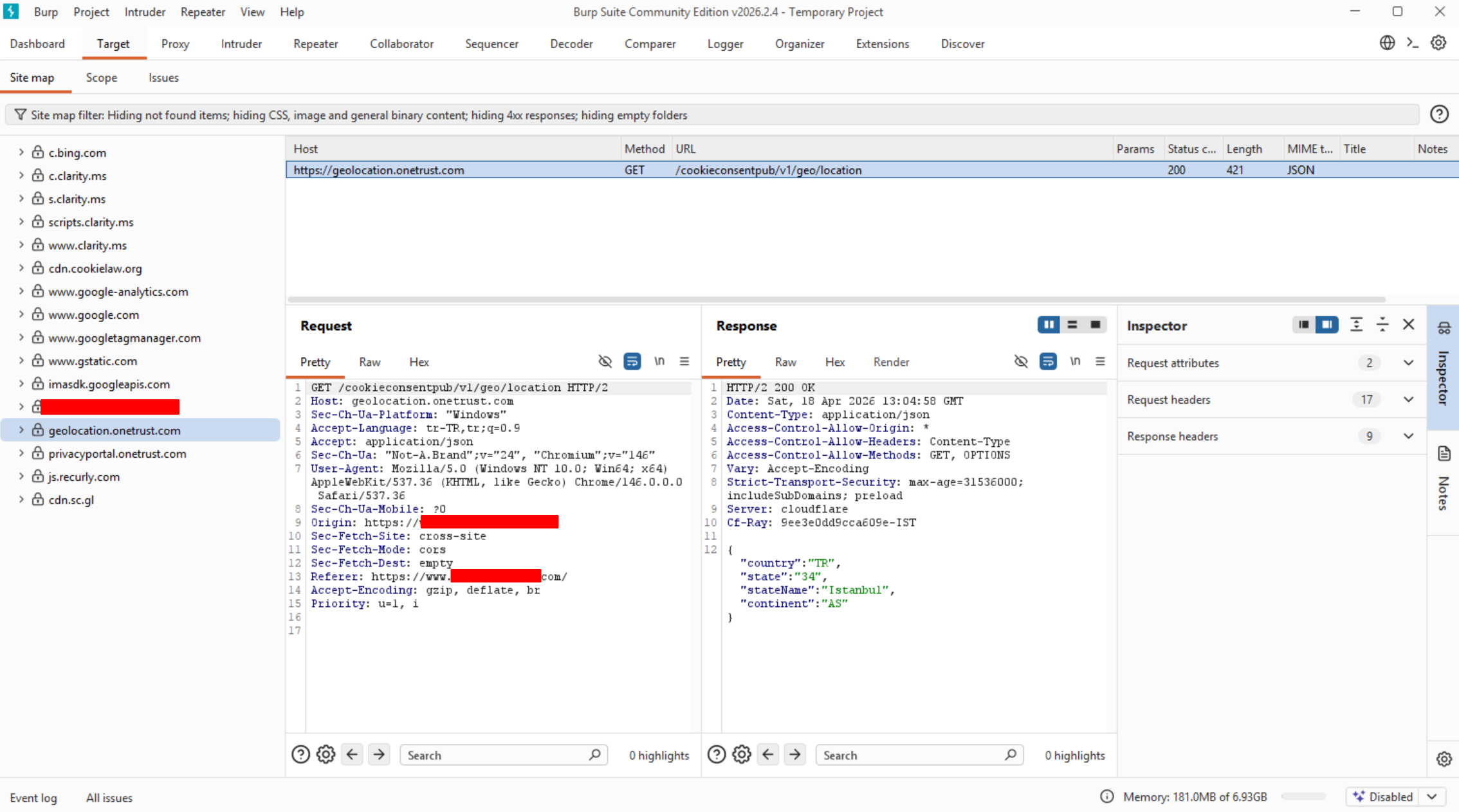
While inspecting the traffic, I noticed the target uses a third-party API called geolocation.onetrust.com to verify my location. The response to this request contained the following:
{ "country": "TR", "state": "34", "stateName": "Istanbul", "continent": "AS" }Getting excited, I used Burp Suite’s “Match and Replace” feature to intercept this TR response in the Response Body and change it like this:
{ "country": "US", "state": "CA", "stateName": "California", "continent": "NA" }The result? Partially successful. Some restrictions in the site’s UI lifted, but when I hit Play the video never started. The site’s frontend was fooled by the JSON response, but the Content Distribution Network behind it didn’t buy the trick.
Step 2: Going for the Real Target (IP Spoofing)
Once I realized the problem wasn’t at the interface level but at the network level, I did a quick search and found I could use a feature that’s been around for years. Since the system runs behind a load balancer, it might trust incoming HTTP headers instead of checking my real IP address.
I wrote the well-known rule to append a US IP to all outgoing requests:
X-Forwarded-For: 104.16.132.229With this rule active, my next attempt showed the video player’s GET /.../hls/master.m3u8 request — where it fetches the actual stream playlist — returning HTTP 200 OK. Even though the system swallowed the fake US IP, I was still getting No compatible source was found on screen.

Step 3: Troubleshooting
If the server wasn’t blocking me, who was? I spotted this interesting detail in the console tab:
otBannerSdk.js:7
Blocked script execution in 'about:blank' because the document's frame is sandboxed
and the 'allow-scripts' permission is not set.
The platform was trying to run an ad player right before starting the film. For these tests I was using Burp’s own browser, which — as I later learned — sandboxes third-party iframe scripts like this and blocks them for security reasons.
When the ad player crashed, it triggered a chain reaction where the actual video also gave up and said it couldn’t find a playable source. In other words, I had actually beaten the geoblocking.
Step 4: The End
To get around this client-side block I closed Burp’s problematic browser and switched to my normal browser. I could have fiddled with proxy settings and routed traffic through Burp again, but since the fix was just a simple HTTP header, I realized I didn’t even need Burp anymore. I installed the ModHeader extension in my browser, added the X-Forwarded-For: 104.16.132.229 rule, refreshed the page — the ad played without a hitch, and then the movie started!

So I ended up doing a small hack attempt on the side of a movie night. It was a really fun experience for me. Even though the real deal was the dead-simple “X-Forwarded” trick, trying out every option and actually solving a real problem I faced felt completely different.
Since the streaming platform in this example is fairly small, its security measures are almost nonexistent. The same methods probably wouldn’t work on most other sites. Still, it’s interesting that in 2026 you can still bypass with a request header.
Thanks for reading, see you in another post :)